Industries · Healthcare

AI Automation for Healthcare Providers

Less admin, smoother patient flow.

A modern hospital cut away to show the ambulance bay, entrance, reception and waiting area, consultation room, pharmacy, laboratory, imaging, records office and discharge lounge, with a control room on the roof
AI automation map01 / 09

Appointments & reception

Booking system · WhatsApp
  • Appointments booked and rescheduled on WhatsApp
  • Reminders that cut no-shows
  • Registration forms filled in before the visit
Outcome: Shorter queues

Less admin for your team, faster answers for patients. Clinical decisions always stay with doctors.

Clinics and healthcare admin teams already run a practice management system, an appointment tool, phone lines, WhatsApp and a lot of email. The gaps are in between: reminders sent by hand, referral letters retyped, insurance pre-approvals chased by phone. I build AI workflows for the administrative side only, on top of the systems you have, with data protection and residency settled before anything is built. The AI never gives clinical advice, and your team approves anything that needs a human eye.

See how we automate HealthcareThe 5-step workflow, what we build at each stage, and the delivery roadmap, plus a live AI prototype to try.
View the automation workflow Run the AI prototype
Demos

See the AI at work

Short demo clips with sample data. Pick a stage to see its demos.

Every enquiry answered and every slot booked, day or night.

Patient enquiry assistant

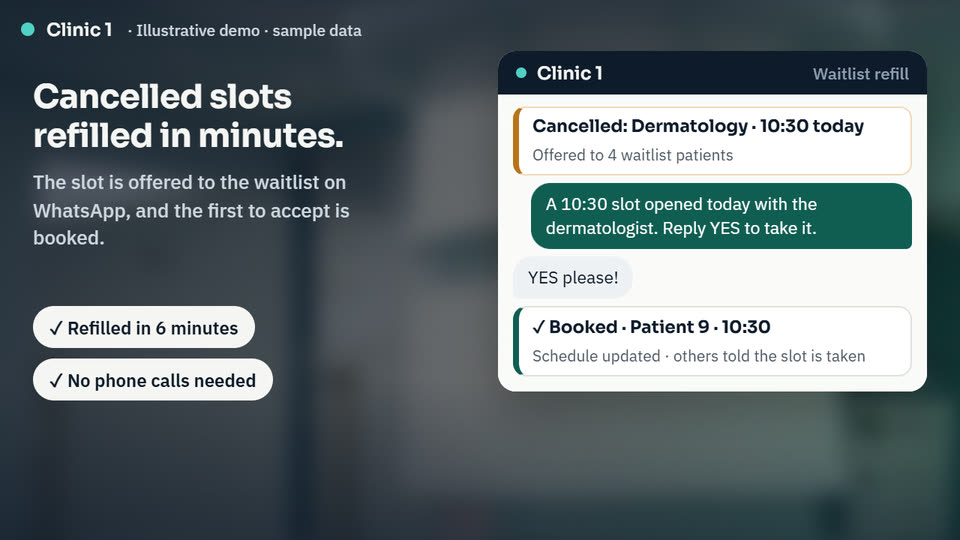
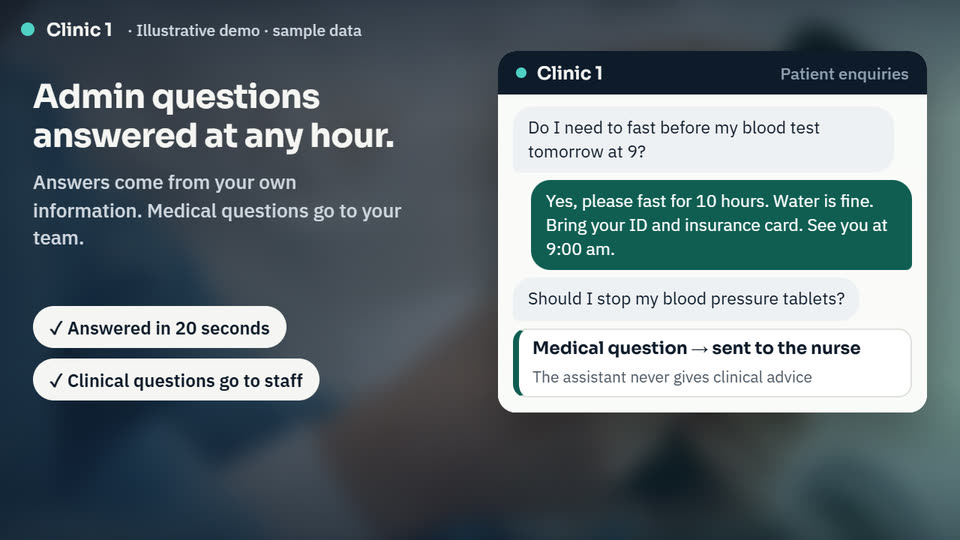
Questions about opening hours, preparation, prices, directions and insurance are answered on WhatsApp and your website from your own information. It never gives clinical advice: medical questions go straight to your team.

Simulate this for my business →

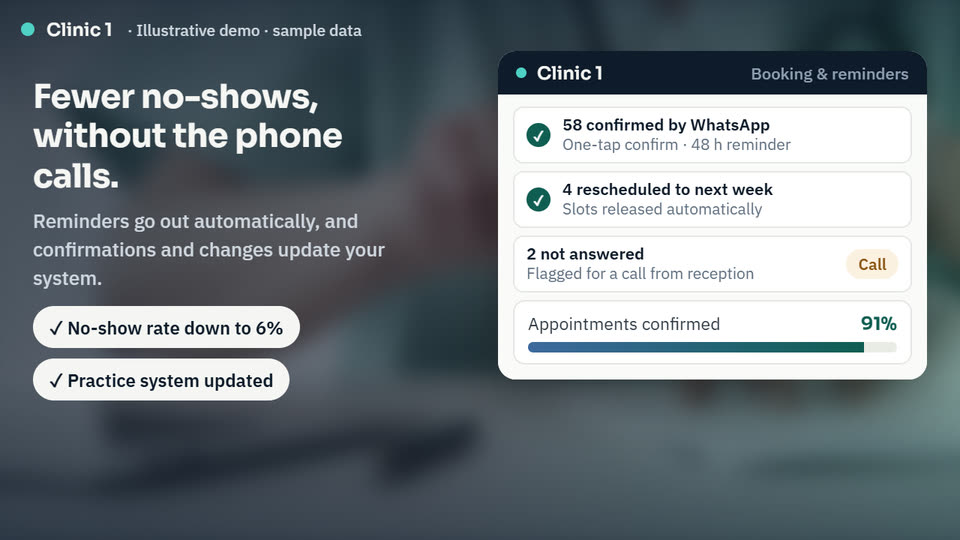
Booking & reminder assistant

Patients book, confirm, reschedule or cancel in one tap on WhatsApp or SMS. Reminders go out 48 and 24 hours before, and every change updates your practice management system.

Simulate this for my business →
10 modules

Patient flow & revenue modules

Ten modules that read your appointment, billing and messaging data, and show where time and revenue are lost.

36 use cases

Every use case, grouped

Open a group to see what can be automated. Mention your favourites in the form below.

Bookings & reminders6
  • Appointment reminders by WhatsApp, SMS or email with one-tap confirm
  • Self-service rescheduling and cancellation outside opening hours
  • Waitlist offers sent when a slot is cancelled
  • Pre-visit preparation instructions sent for scans and tests
  • No-show follow-up messages with an easy rebooking link
  • Recall reminders for check-ups and routine screenings
Patient enquiries6
  • Answers to admin questions: hours, location, parking, prices, insurers
  • After-hours enquiry capture with a call-back request for staff
  • Arabic and English replies for front-desk messages
  • Clear hand-off to staff for anything medical or urgent
  • Shared inbox sorted by booking, billing, results and complaints
  • Feedback requests after visits, with issues routed to managers
Referrals & documents6
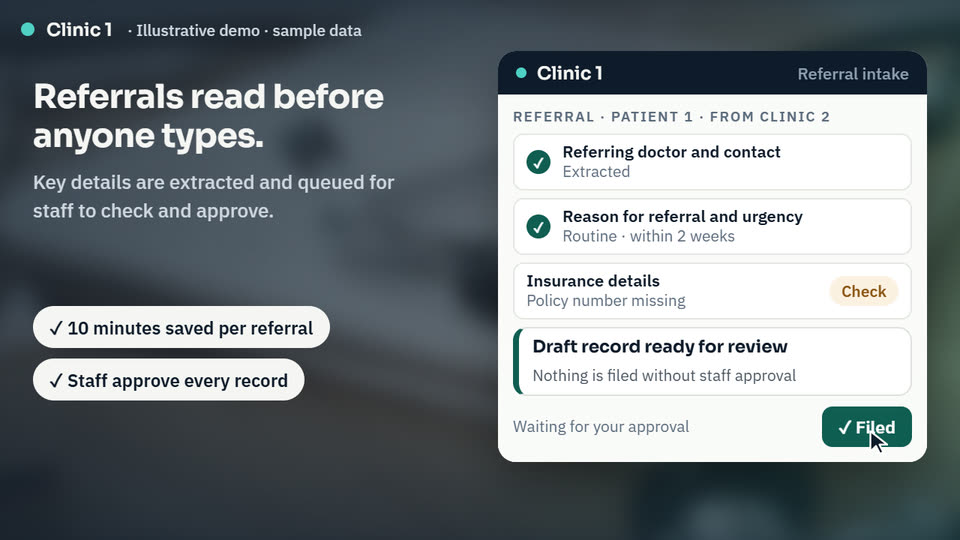
  • Referral letters read and key details queued for staff review
  • Intake forms pre-filled from previous visits, checked by the patient
  • Missing documents chased before the appointment
  • Report-ready notifications once a clinician has released results
  • Medical record request tracking with due dates
  • Consent form collection and reminders before procedures
Billing & insurance6
  • Insurance eligibility checks before the visit
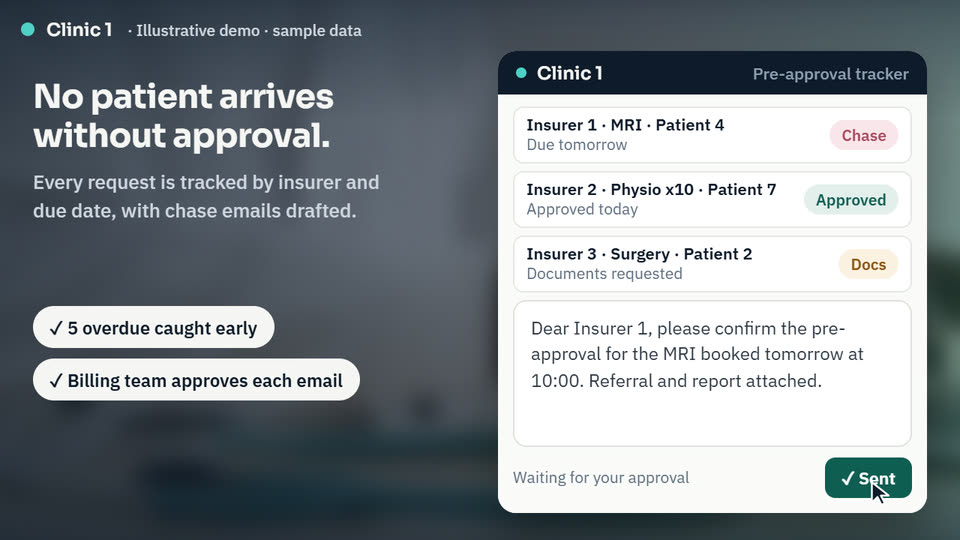
  • Pre-approval requests prepared and tracked with each payer
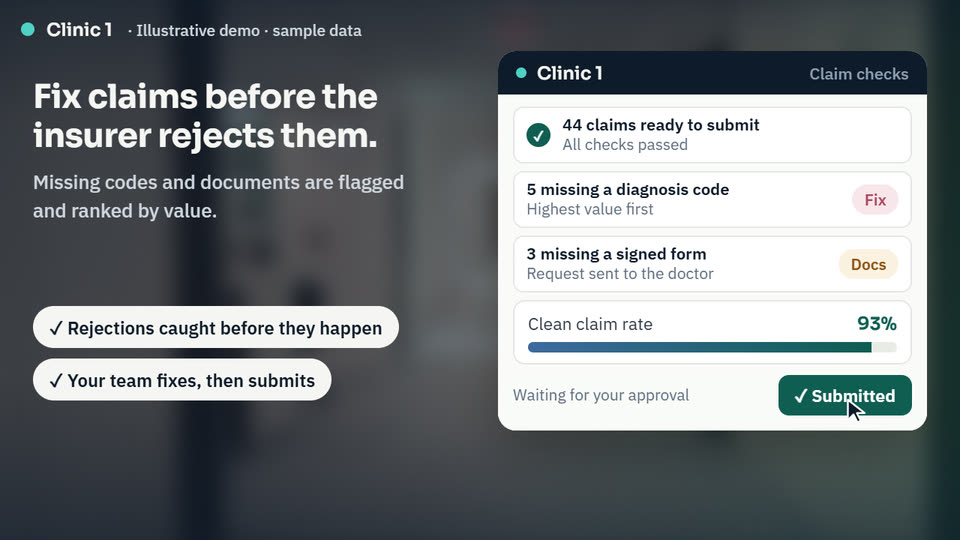
  • Claim checks for missing codes, documents and patient details
  • Rejected claim reasons summarised with suggested fixes for staff
  • Payment reminders and payment links for patient balances
  • Daily reconciliation of payments against bookings
Patient flow & operations6
  • Daily schedule summary with gaps and overbooked sessions flagged
  • Waiting time tracking from check-in to consultation
  • Room and equipment booking clash alerts
  • Staff rota gaps flagged against expected patient volume
  • Reorder alerts for consumables and supplies
  • Admin handover notes drafted from the day's logs for staff review
Reporting & compliance6
  • Morning dashboard of bookings, no-shows, waits and claims
  • Access logs and audit trails for every automated action
  • Monthly management pack drafted for your review
  • Data retention reminders in line with your policy
  • Complaint tracking with response deadlines
  • Referral source reports to see where patients come from
Sample dashboard

Your clinic at a glance, every morning

The numbers and workflow statuses I'd set up for a clinic or diagnostics centre, in one view. Illustrative only: a fictional clinic with sample data.

Clinic 1Last 30 days vs previous 30 · sample dataUpdated today, 7:00 am
Appointments3,184 12%
No-show rate6% 3 pts
Avg wait (mins)14 5 mins
Clean claim rate93% 4 pts

Billed revenue

Monthly, last 12 months
$344k 20% in 12 months
Billed revenue by month. Nov: $286k; Dec: $291k; Jan: $288k; Feb: $297k; Mar: $305k; Apr: $309k; May: $316k; Jun: $322k; Jul: $319k; Aug: $331k; Sep: $338k; Oct: $344k. $280k$300k$320k$340k$360k NovDecJanFebMarAprMayJunJulAugSepOct
$108average billed per appointment
186slots refilled from the waitlist
$18.4kfrom claims fixed before submission

Automations

Slot utilisation by department

Booked slots as a share of available, last 30 days
Dental: 91%
Physio: 86%
Dermatology: 79%
Radiology: 72%
Paediatrics: 64%

Automation at work

Last 30 days
89%
Reminders delivered and confirmed
91%
Enquiries answered in under a minute
100%
Claims checked before submission
How it works

An AI layer on top of the systems you already use

  1. 01Your systemsCRM, ERP, booking, POS, email, WhatsApp and spreadsheets
  2. 02Knowledge baseYour policies, price lists, FAQs and documents
  3. 03White-label AI agentReads requests, decides and drafts the next step
  4. 04Workflow automationTasks assigned and actions taken, with approvals
  5. 05Dashboards & alertsDaily summaries, exceptions and reports
Your environment. Your data. Your agents.

Agents are white-labelled and deployed in your own technology stack. You keep control of users, data and the solution, and a person approves every important action.

  • 100% white label
  • On-prem or in your cloud
  • Role-based approvals

How we start: one workflow, not a platform

  1. Step 1Pick a priority workflowOne workflow for a pilot, or several for a phased roll-out.
  2. Step 2Workflow discoveryWe map your systems, manual steps and data, and which decisions AI recommends or takes.
  3. Step 3Fixed-scope proposalArchitecture, plan, timeline and a one-time cost.
  4. Step 4Build, deploy, hand overIntegration, agent build, testing and deployment in your stack, then full handover.
FAQ

Questions I get asked

Something else on your mind? Ask me on a short call.

Will this work with the clinic systems we already use?

Yes. I build on top of your existing practice management or hospital information system, for example Epic, Oracle Health or a regional clinic platform, plus your phone lines, WhatsApp and email. Each workflow reads and writes only what it needs, through approved integrations, so staff keep working in the screens they know.

Does the AI give medical advice or make clinical decisions?

No. The AI handles administrative work only: bookings, reminders, documents, billing and admin questions. It never diagnoses, triages or gives clinical advice, and any message that touches symptoms, results or treatment is handed straight to your staff. Clinicians stay fully responsible for every clinical decision.

How is patient data protected, and where is it stored?

Data protection and residency are settled before anything is built. We agree which data each workflow may touch, where it is hosted, for example in-country cloud regions in the UAE or Saudi Arabia, how long it is kept and who can see it. I use AI services that do not train on your data, and every action is logged for audit.

Will patients receive messages without staff knowing?

Only routine ones you approve in advance, such as appointment reminders and preparation instructions. Anything sensitive, like a billing dispute or a request involving results, is prepared as a draft for approval or routed to a person. You can see every message the system sends and switch any workflow back to manual at any time.

Do I need to be technical?

No. You need to know how your clinic runs, which you already do. I handle the set-up, integrations and testing, and your front desk and billing team use the results in the tools they already work in. I provide short guides and stay available for changes as your needs grow.

How long does it take, and what does it cost?

It depends on your tools, the size of your practice and the use cases you choose, as well as how long your data protection review takes. A short call is enough for me to give you a clear scope, timeline and price for the first step, which is often reminders or admin enquiries.

Where do most clinics start?

Usually with appointment reminders and admin enquiries. They take pressure off the front desk, reduce empty slots and involve no clinical content. Once those run well, referral intake and claim checks tend to follow, because they save billing and admin staff the most time.

Get started

Choose your next step

Three ways to start. Pick the one that suits you, there is no obligation.

Tell me about your clinic or practice

Takes about two minutes. You get a short plan with your quickest wins, and your free offer on request.

About you

What you need

What would you like to automate or improve?
Would you like the free no-show audit first?
Still have questions? Chat on WhatsApp
By sending, you share these details with ShazzBiz only, to prepare a plan. See the Privacy Policy.