Industries · Insurance

AI Automation for Insurers and Brokers

Faster intake, cleaner files, people still decide.

A city block at night showing insured moments: a car accident with a tow truck, a storm-damaged house with a surveyor, a small shop, an ambulance at a clinic, a customer calling from home, and the insurer's glass office tower
AI automation map01 / 09

Motor claims

Claims system · WhatsApp
  • Accident reported on WhatsApp with photos
  • Tow and garage arranged faster
  • Customer updated at every step
Outcome: Faster motor claims

From first notice of loss to settlement. Claim decisions always stay with your team.

Insurers and brokers already run a policy administration system, a claims platform, a CRM, portals and inboxes full of forms, photos and PDFs. Much of the day goes on retyping, chasing missing documents and preparing files before anyone can make a decision. I build AI workflows on top of the systems you have to capture, check and summarise that information, with data protection and residency settled before building. The AI does not make underwriting or claims decisions: your team approves every one.

See how we automate InsuranceThe 5-step workflow, what we build at each stage, and the delivery roadmap, plus a live AI prototype to try.
View the automation workflow Run the AI prototype
Demos

See the AI at work

Short demo clips with sample data. Pick a stage to see its demos.

Every claim logged and acknowledged, without retyping.

Claims intake assistant

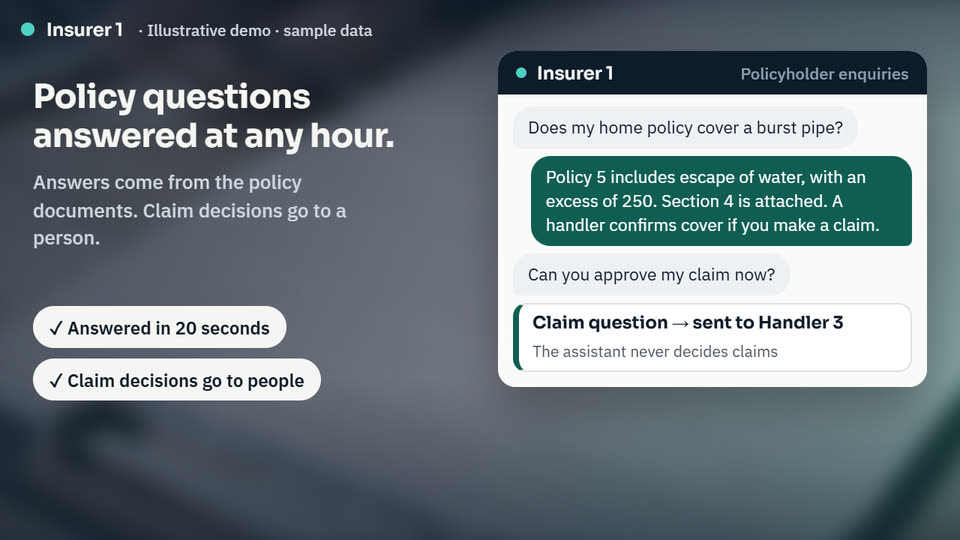
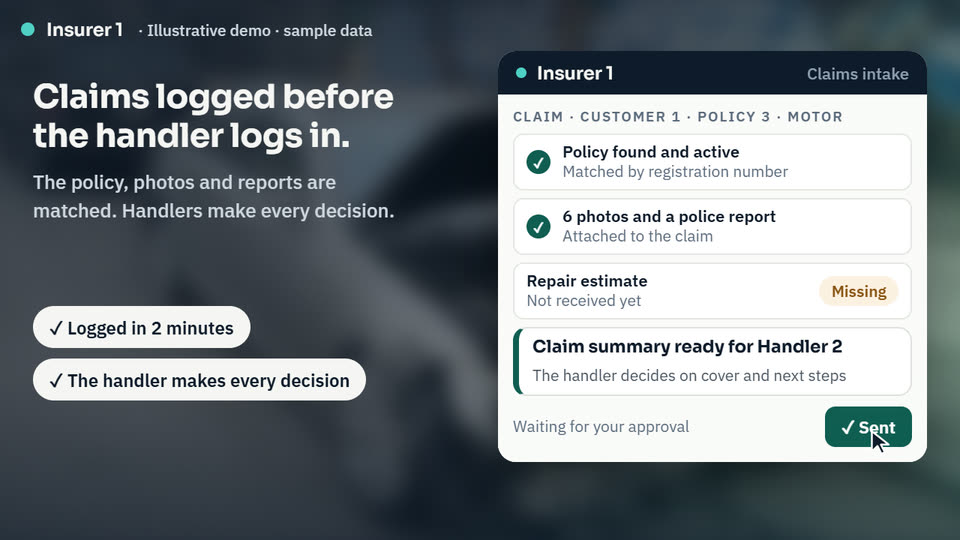
Claims arriving by email, portal or WhatsApp are matched to the policy, photos and reports are attached and a summary is prepared for the handler. The AI never approves or declines a claim: your handlers make every decision.

Simulate this for my business →
10 modules

Claims & operations modules

Ten modules that read your policy, claims and messaging data, and show where time is lost and files are waiting.

Appetite Check

Compares each submission with your underwriting guidelines and notes any mismatch for the underwriter to review.

Ask for pricingSubmit the form

Quote Request Capture

Captures quote requests from email, checks the details and routes them to the right account handler.

Ask for pricingSubmit the form

New Broker & Corporate Accounts

B2B growth: brokers, agencies and companies researched and approached for new distribution and group cover.

Ask for pricingSubmit the form
34 use cases

Every use case, grouped

Open a group to see what can be automated. Mention your favourites in the form below.

Claims intake & handling6
  • First notice of loss captured from email, portal, calls or WhatsApp
  • Claim acknowledgements with a reference number and next steps
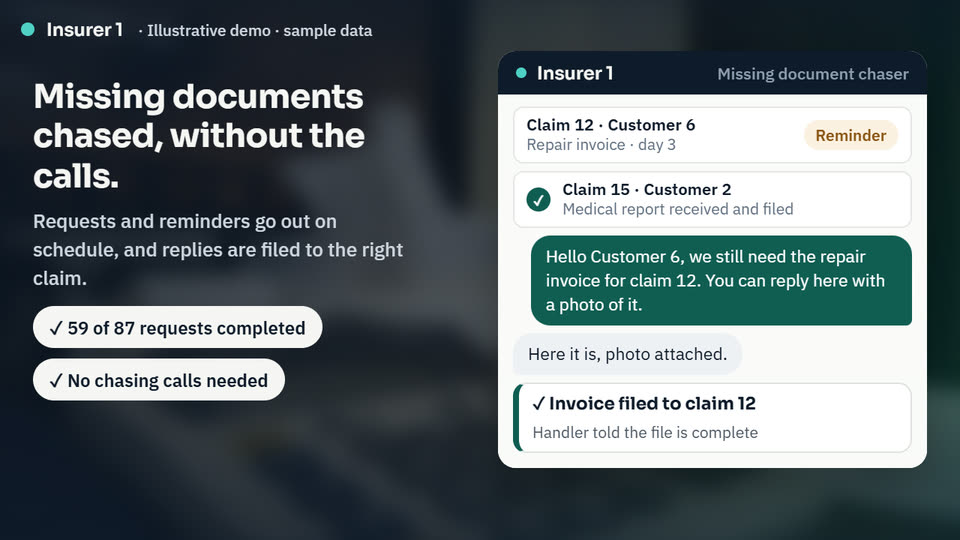
  • Photos, invoices and reports attached to the right claim file
  • Claim summaries prepared for handlers, who make every decision
  • Status updates to claimants drafted for handler approval
  • Possible fraud indicators flagged for a specialist to review
Documents & data6
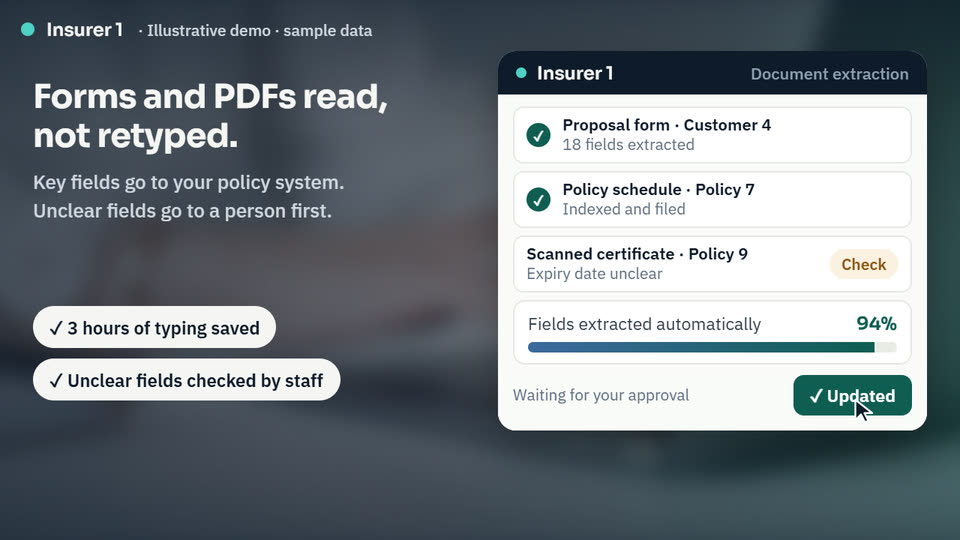
  • Proposal forms, schedules and certificates read and indexed
  • Key fields extracted from PDFs into your policy system
  • Missing document requests sent and chased automatically
  • Policy wording comparisons highlighting changed clauses
  • Arabic and English document handling
  • Duplicate and inconsistent data flagged before it enters the system
Underwriting support6
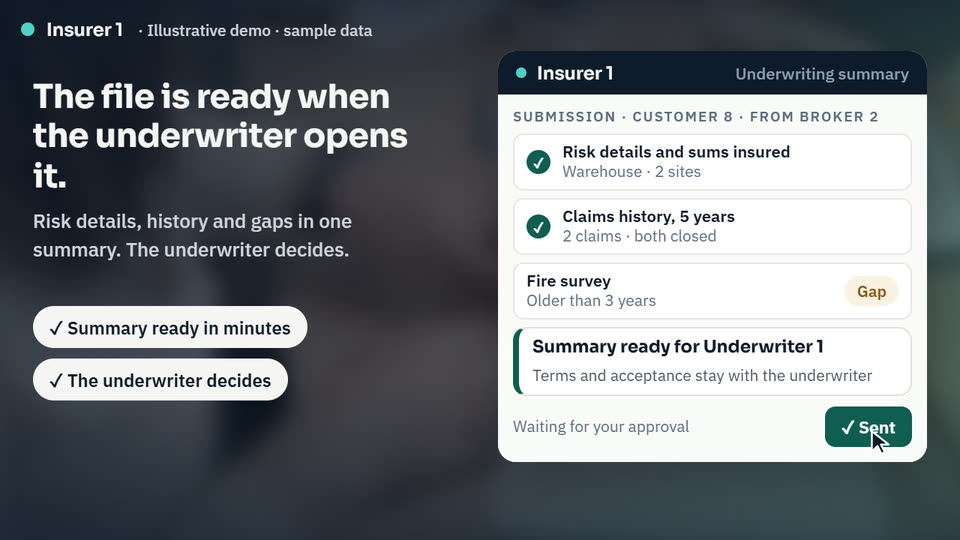
  • Submission summaries with risk details laid out for underwriters
  • Appetite checks against your guidelines, for underwriter review
  • Prior claims and policy history pulled into one view
  • Missing information lists sent back to brokers
  • Referral notes drafted for senior underwriter sign-off
  • Quote letter drafts once the underwriter has set terms
Sales, quotes & renewals6
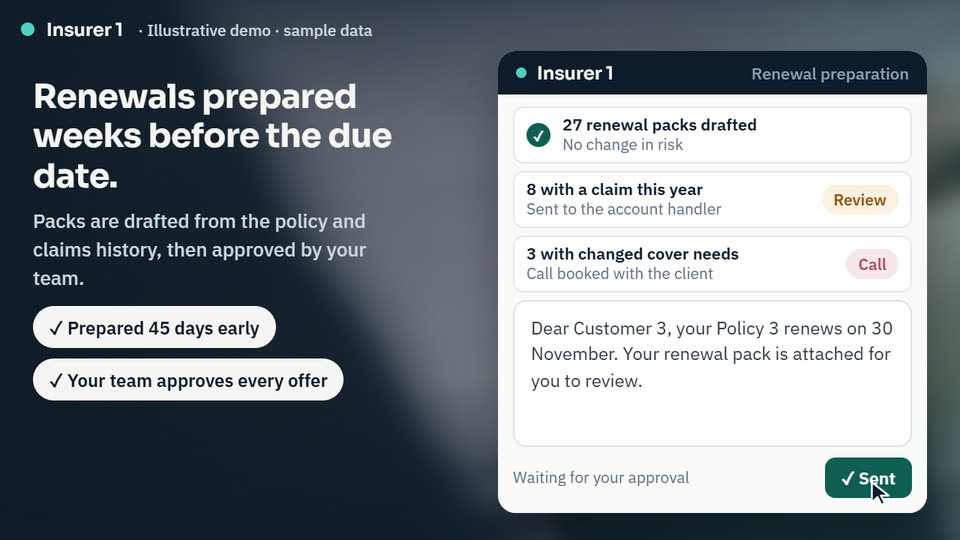
  • Renewal packs prepared 30 to 60 days before expiry
  • Quote requests from email captured with details checked
  • Market comparison tables drafted for broker review
  • Cross-sell prompts based on gaps in a client's cover
  • Lapsed policy follow-ups drafted for approval
  • Lead and enquiry routing to the right account handler
Policyholder service6
  • Policy and claim status questions answered by WhatsApp or email
  • Certificate and document requests handled on demand
  • Mid-term change requests captured and queued for staff
  • Complaint detection with routing to a named person
  • Payment reminders and instalment schedules
  • Satisfaction surveys after claims are closed
Compliance & reporting4
  • Audit trail of every automated action and approval
  • Regulatory deadline and licence renewal reminders
  • Monthly book review with loss ratios and renewal rates
  • Ask questions of your policy and claims data in plain English
Sample dashboard

Your book at a glance, every morning

The numbers and workflow statuses I'd set up for a broker or insurer, in one view. Illustrative only: a fictional book with sample data.

Insurer 1Last 30 days vs previous 30 · sample dataUpdated today, 7:00 am
New policies486 9%
Renewal rate88% 3 pts
Quote time (hrs)9 5 hrs
Claim setup (hrs)4 6 hrs

Gross written premium

Monthly, last 12 months
$2,146k 17% in 12 months
Gross written premium by month. Nov: $1,840k; Dec: $1,872k; Jan: $1,859k; Feb: $1,905k; Mar: $1,938k; Apr: $1,961k; May: $2,004k; Jun: $2,033k; Jul: $2,021k; Aug: $2,078k; Sep: $2,112k; Oct: $2,146k. $1,800k$1,900k$2,000k$2,100k$2,200k NovDecJanFebMarAprMayJunJulAugSepOct
$1.9kaverage premium per new policy
312claims set up from email and portal
128renewals prepared ahead of the due date

Automations

Straight-through intake by line

Share of claims logged without retyping, last 30 days
Motor: 92%
Travel: 88%
Property: 79%
Health: 71%
Commercial: 58%

Automation at work

Last 30 days
97%
Claims acknowledged within an hour
93%
Documents indexed automatically
86%
Renewals prepared 30 days early
How it works

An AI layer on top of the systems you already use

  1. 01Your systemsCRM, ERP, booking, POS, email, WhatsApp and spreadsheets
  2. 02Knowledge baseYour policies, price lists, FAQs and documents
  3. 03White-label AI agentReads requests, decides and drafts the next step
  4. 04Workflow automationTasks assigned and actions taken, with approvals
  5. 05Dashboards & alertsDaily summaries, exceptions and reports
Your environment. Your data. Your agents.

Agents are white-labelled and deployed in your own technology stack. You keep control of users, data and the solution, and a person approves every important action.

  • 100% white label
  • On-prem or in your cloud
  • Role-based approvals

How we start: one workflow, not a platform

  1. Step 1Pick a priority workflowOne workflow for a pilot, or several for a phased roll-out.
  2. Step 2Workflow discoveryWe map your systems, manual steps and data, and which decisions AI recommends or takes.
  3. Step 3Fixed-scope proposalArchitecture, plan, timeline and a one-time cost.
  4. Step 4Build, deploy, hand overIntegration, agent build, testing and deployment in your stack, then full handover.
FAQ

Questions I get asked

Something else on your mind? Ask me on a short call.

Will this work with the policy and claims systems we already use?

Yes. I build on top of your existing systems, for example Guidewire, Duck Creek or Applied Epic, plus your CRM, portals and inboxes. The automation reads and updates records through approved integrations or exports, so handlers, brokers and underwriters keep working in the screens they know.

Does the AI make underwriting or claims decisions?

No. The AI captures, checks and summarises information so your people can decide faster. Accepting a risk, setting terms, approving or declining a claim and agreeing a settlement always stay with qualified underwriters and handlers. Any message about a decision is a draft for approval, and nothing is sent until a person signs it off.

How is policyholder data protected, and where does it live?

Data protection and residency are agreed before anything is built: which data each workflow may use, where it is hosted, for example in-country cloud regions, how long it is kept and who can access it. I use AI services that do not train on your data, and every action is logged so your compliance team can audit it.

Can it read scans, photos and Arabic documents?

In most cases, yes. Modern document AI handles scans, photos, tables and Arabic and English text well. Each extracted field carries a confidence score, and anything below the threshold you set goes to a person to check, so poor-quality documents do not slip into the system unnoticed.

Do I need to be technical?

No. You need to know how your book and your processes work, which you already do. I handle the integrations, set-up and testing, and your team uses the results inside the systems they already work in. I provide short guides and stay available for changes.

How long does it take, and what does it cost?

It depends on your tools, the size of your book and the use cases you pick, as well as your compliance review. A short call is enough for me to give you a clear scope, timeline and price for the first step, which is often claims intake or document extraction.

Where should a broker or insurer start?

Usually with claims intake or missing-document chasing. Both cut retyping and waiting, are easy to measure and involve no decisions by the AI. Underwriting summaries and renewal preparation tend to follow once the team trusts the extracted data.

Get started

Choose your next step

Three ways to start. Pick the one that suits you, there is no obligation.

Tell me about your insurance business

Takes about two minutes. You get a short plan with your quickest wins, and your free offer on request.

About you

What you need

What would you like to automate or improve?
Would you like the free claims intake audit first?
Still have questions? Chat on WhatsApp
By sending, you share these details with ShazzBiz only, to prepare a plan. See the Privacy Policy.