Industries · Retail

AI Automation for Retail Businesses

Right stock, right store, more repeat customers.

Book a 15-min call WhatsApp LinkedIn Watch the demos
01Stock visibilityStock sync across channels
02Purchasing & suppliersReorder suggestions
03Customer serviceCustomer service assistant
04Loyalty & tradingLoyalty win-back offers
05You approveNothing goes out unchecked

From first message to approved action. A person stays in control at every step.

01Stock sync across channels02Reorder suggestions03Customer service assistant04Loyalty win-back offers05You approve
Sample dashboard

Your stores at a glance, every morning

The numbers and workflow statuses I'd set up for a multi-store retailer, in one view. Illustrative only: a fictional stores with sample data.

Store 1Last 30 days vs previous 30 · sample dataUpdated today, 7:00 am
Transactions18,420 12%
Stock accuracy97% 5 pts
Out-of-stocks3.2% 1.4 pts
Repeat customers44% 3 pts

Store and online revenue

Monthly, last 12 months
$694k 27% in 12 months
Store and online revenue by month. Nov: $548k; Dec: $571k; Jan: $602k; Feb: $566k; Mar: $584k; Apr: $596k; May: $611k; Jun: $623k; Jul: $640k; Aug: $652k; Sep: $671k; Oct: $694k. $500k$600k$700k NovDecJanFebMarAprMayJunJulAugSepOct
$38average basket
$12.4kof overstock moved to stores that need it
$4.6kfrom loyalty win-back offers this month

Automations

Sell-through by category

Share of stock sold, last 30 days
Beauty: 72%
Homeware: 58%
Toys: 49%
Electronics: 41%
Stationery: 34%

Automation at work

Last 30 days
97%
Stock counts matched across systems
89%
Customer questions answered in a minute
91%
Reorders suggested from sales data

Most retailers already run a POS in each store, an ERP or inventory system, an online shop, a loyalty programme and a customer service inbox. The trouble is the gaps between them: stock counts that disagree, reorders placed on gut feel, promotions planned without sales data and customer questions answered by hand. I connect those systems and build AI workflows for stock visibility, reordering, customer insights and service, with your team approving anything that needs a human eye, such as purchase orders and customer messages.

Free stock & sales audit

Send me a recent export of sales and stock by store (no customer details needed). I show you where out-of-stocks, overstock and slow lines are costing you, and the three fixes to start with.

  • Out-of-stocks and overstock by store and category
  • Slow lines to act on before the season ends
  • Gaps between POS, ERP and online stock counts
  • A simple 30-day action plan
Claim my free audit Or book a free 15-min live demo Sales and stock data only, no customer or card details. Your data stays confidential and is deleted after the audit.
Time saved calculator

How much time could automation give back?

Enter your own numbers: repetitive tasks like enquiries, bookings, documents, orders and reports. Nothing is sent anywhere.

Planning assumptionsPlanning assumptions only, not a promise. A person still approves anything important.
0staff hours freed a month
0cost of that time a month
0hours a year
0full-time staff equivalent

Get my free audit
Workflow simulation

Watch two weeks of work in 15 seconds

A simulated fortnight at Store 1. Each card is an order moving through your workflow, with a person approving anything important. Sample data.

Day 0 of 14
Stock visibility0
Purchasing & suppliers0
Customer service0
Loyalty & trading0
Approved0
Order 1Stock sync across channels
Order 2Inter-store transfer…
Order 3Reorder suggestions
Order 4Customer service assistant
Order 5Loyalty win-back offers
Order 6Markdown suggestions
Order 7Stock sync across channels
Order 8Inter-store transfer…

    Simulation with sample data. Real timing depends on your volumes, systems and team.

    Stage 01

    Stock visibility

    One stock count you can trust, in every store and online.

    Stock sync across channels

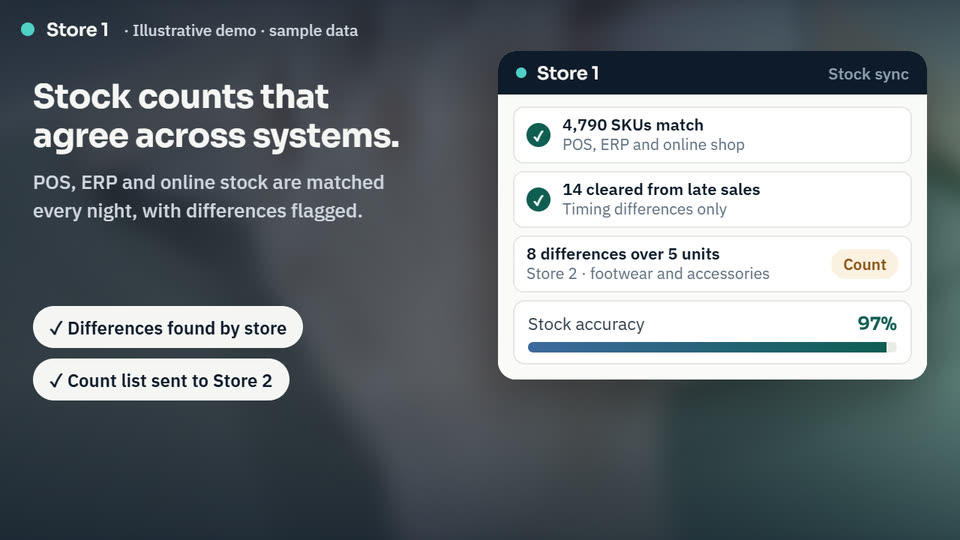
    Every night, stock in your POS, ERP and online shop is compared line by line. Timing gaps are cleared, and real differences are flagged by store so staff know exactly what to count and correct.

    Simulate this for my business →

    Inter-store transfer suggestions

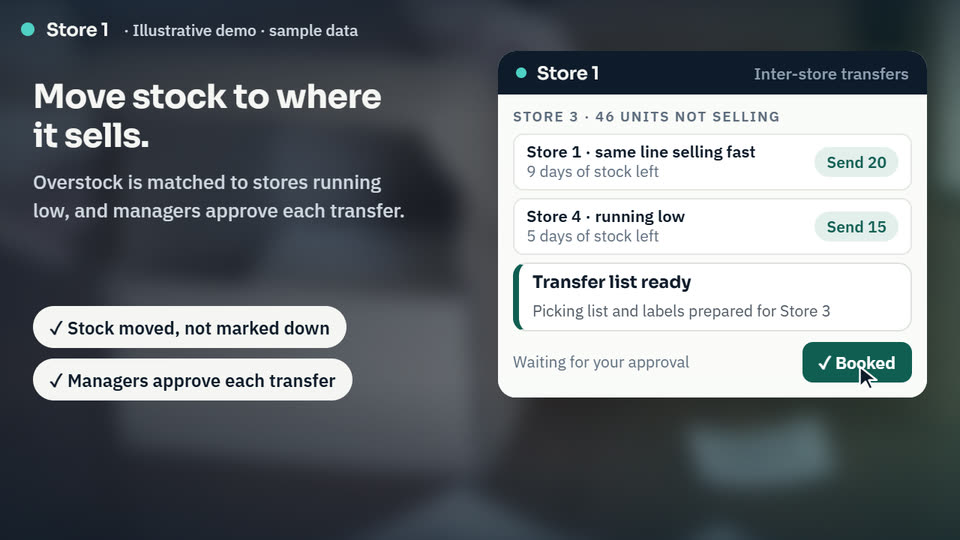
    Lines that are not selling in one store are matched to stores where the same line is running low. A transfer list and picking list are prepared, and the manager approves each transfer before anything moves.

    Simulate this for my business →
    Stage 02

    Purchasing & suppliers

    Reorders based on sales data, approved by you.

    Reorder suggestions

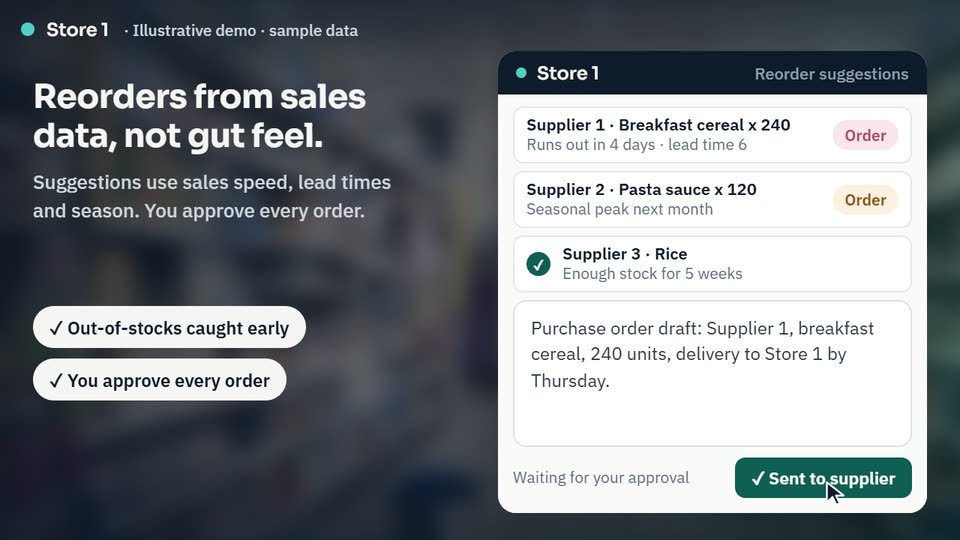
    Sales speed, supplier lead times and season are checked against stock every week. Lines likely to run out are suggested for reorder, and a purchase order draft is prepared. Nothing goes to a supplier until you approve it.

    Simulate this for my business →
    Stage 03

    Customer service

    Order, stock and returns questions answered at any hour.

    Customer service assistant

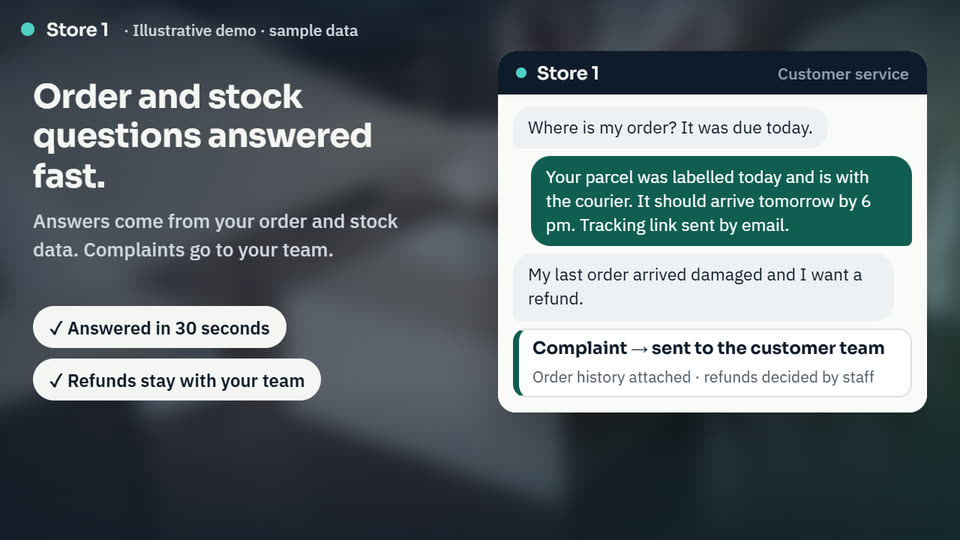
    Questions about orders, delivery, stock, opening hours and returns are answered on your website and WhatsApp from your own order and stock data. Complaints and refund requests go to your team with the order history attached.

    Simulate this for my business →
    Stage 04

    Loyalty & trading

    More repeat customers and fewer deep discounts.

    Loyalty win-back offers

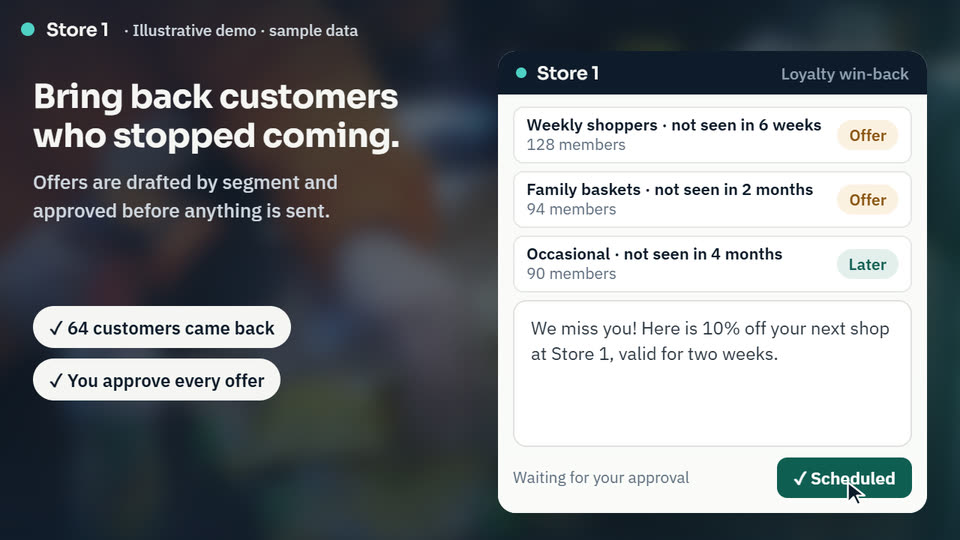
    Loyalty members who have stopped visiting are grouped by how they used to shop. An offer is drafted for each group, and you approve it before anything is sent.

    Simulate this for my business →

    Markdown suggestions

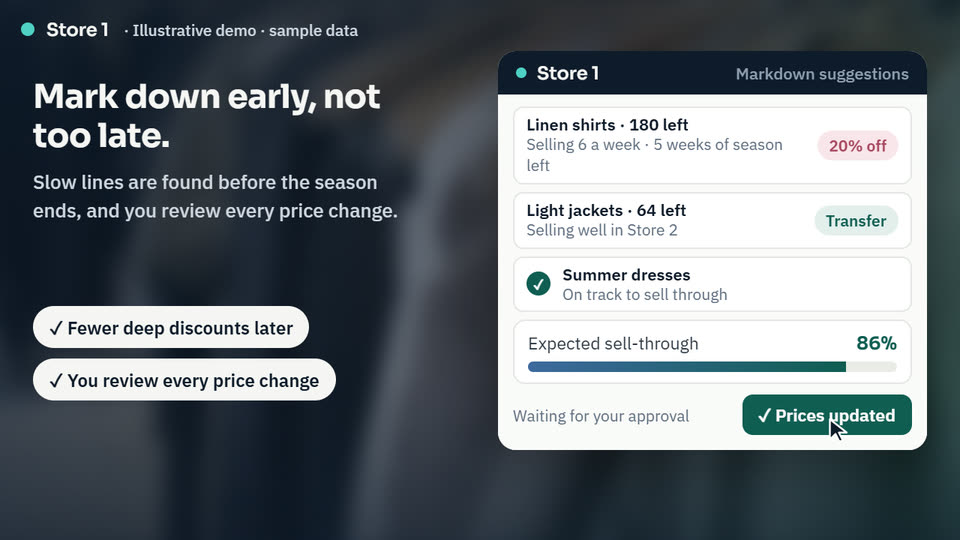
    Slow-moving lines are found from sales data well before the season ends. Each one gets a suggested markdown or a transfer to a store where it sells, and you review every price change.

    Simulate this for my business →
    10 modules

    Stock & customer modules

    Ten modules that read your POS, ERP, online shop and loyalty data, and show where stock, margin and customers are lost.

    Morning Trading Brief

    A morning summary of sales, stock and promotions by store and channel, sent to managers on WhatsApp.

    Ask for pricingSubmit the form

    Corporate & Wholesale Accounts

    B2B growth: companies, offices and resellers researched and approached for bulk orders and corporate gifting.

    Ask for pricingSubmit the form
    Ready-made software

    Need the software itself?

    Proven systems we demo, set up, support and extend with AI. Pricing on a call.

    36 use cases

    Every use case, in one checklist

    For retailers with one or more stores, often with an online shop as well. Tick what fits your business, then send me your list and I'll tell you where to start.

    Stock & inventory visibility
    Purchasing & suppliers
    POS, ERP & online integration
    Customer service
    Customer insights & loyalty
    Trading & reporting
    0 use cases picked. Tick the ones that fit your business. Book a call about these Email me my list
    Starter packs

    Start with a pack, not a platform

    Each pack bundles the use cases that work best together, so you get a working result first and add more once it pays off.

    Stock Control Pack

    Best for: Retailers whose stock counts disagree and whose shelves run empty.

    Pricing depends on your number of stores, product lines and the systems you use, so I scope it with you on a short call. Ask for pricingSubmit the form

    Trading & Margin Pack

    Best for: Buyers and owners who want fewer late markdowns and reliable suppliers.

    Pricing depends on your number of stores, product lines and the systems you use, so I scope it with you on a short call. Ask for pricingSubmit the form

    Customer Service Pack

    Best for: Stores and online shops that answer the same questions every day.

    Pricing depends on your number of stores, product lines and the systems you use, so I scope it with you on a short call. Ask for pricingSubmit the form

    Customer Growth Pack

    Best for: Retailers that want more repeat customers and new corporate buyers.

    Pricing depends on your number of stores, product lines and the systems you use, so I scope it with you on a short call. Ask for pricingSubmit the form
    Inquiry form

    Tell me about your retail business

    Fill in this form. Your details go to shahzad@shazzbiz.com and you get a short plan with your quickest wins and pricing. Questions first? Ask on WhatsApp.

    Takes about two minutes. You get a short plan with your quickest wins, and your free offer on request.

    About you

    What you need

    What would you like to automate or improve?
    Would you like the free stock and sales audit first?
    Still have questions? Chat on WhatsApp
    By sending, you share these details with ShazzBiz only, to prepare a plan. See the Privacy Policy.
    FAQ

    Questions I get asked

    Something else on your mind? Ask me on a short call.

    Will this work with the systems I already use?

    Yes. I build on top of what you run today, for example Lightspeed, Square or Shopify POS in store, and Business Central, NetSuite or Odoo for ERP and inventory. Where your systems have APIs or exports, the workflows connect to them directly, so there is no need to replace your POS or retrain staff on a new till.

    Will AI place orders with suppliers or change prices on its own?

    Only if you want it to. Purchase orders, transfers, markdowns and customer offers run in draft for approval mode, so you or your managers check them before anything is sent or changed. Routine updates, like stock syncs and order notifications, can run automatically. Anything unusual, like a complaint or a large order, is routed to a person.

    Our stock counts never match. Can you fix that?

    Usually the cause is a mix of timing, manual adjustments and systems that sync at different times. I start by mapping how stock moves between your POS, ERP and online shop, then set up regular reconciliation with differences flagged by store and product, so you can see where errors start and correct them at the source.

    How is customer and payment data protected?

    Workflows only access the data they need, using your own system accounts and permissions. Card payment data stays with your payment provider and is never handled by the automations. Customer data stays in your systems and is not used to train public models, and we agree data protection rules, including GDPR where it applies, before anything is built.

    I only have one or two stores. Is this for me?

    Yes. Smaller retailers often feel the gaps most, because the owner is the one checking stock, placing orders and answering messages. A couple of well-chosen workflows, such as reorder suggestions and a customer question assistant, can save hours each week without a large project.

    Do I need to be technical?

    No. You and your team keep working in your POS, ERP and inbox as you do now. I handle the connections, setup and testing, and show you how each workflow behaves and how to approve or adjust what it suggests. If you can run your store systems today, you can work with these.

    How long does it take, and what does it cost?

    It depends on your tools, the number of stores and which use cases you start with. Many first workflows are live within a few weeks. A short call is enough for me to give you a clear scope, timeline and price for the first step, so you know what you are committing to before any work starts.
    Want to see these workflows in your business?

    Free 15-minute call · I'll point out your quickest win · No obligation

    Book your call